Live interpreting for professional multilingual events
The latest generation of immediate speech recognition, language detection, and translated audio. LanguageOps Live runs events with guest access, up to 70 listener languages, one audio channel per language, live terminology correction, and a client-ready transcript and report when it’s over.
Raw translation quality isn’t the hard part any more
Live speech recognition and translation have moved quickly. What still goes wrong at real events is control: language detection, natural conversation, terminology, per-listener audio, reporting, and cost.
-
Names come out wrong
Product names, people and acronyms get mangled mid-event, and in a meeting app nobody can fix them while the client is listening.
-
One caption track isn’t an event
A French listener, a Spanish listener and a German listener should each hear and read their own language, on their own channel, instead of squinting at one shared stream of text.
-
The event ends, the work starts
Clients want transcripts, corrections and a usage summary. Agencies need billable numbers. Stitching that together by hand eats the margin.
From invite to report, one workflow
Schedule and invite
Set the languages, password, glossary, recording and retention. Guests join from a link on any device, with nothing to install and no account to create.
Everyone listens in their own language
Listeners choose the language channel they want. Speech is recognised immediately, the source language is detected, and each selected language gets clean translated audio plus live captions.
Correct terminology live
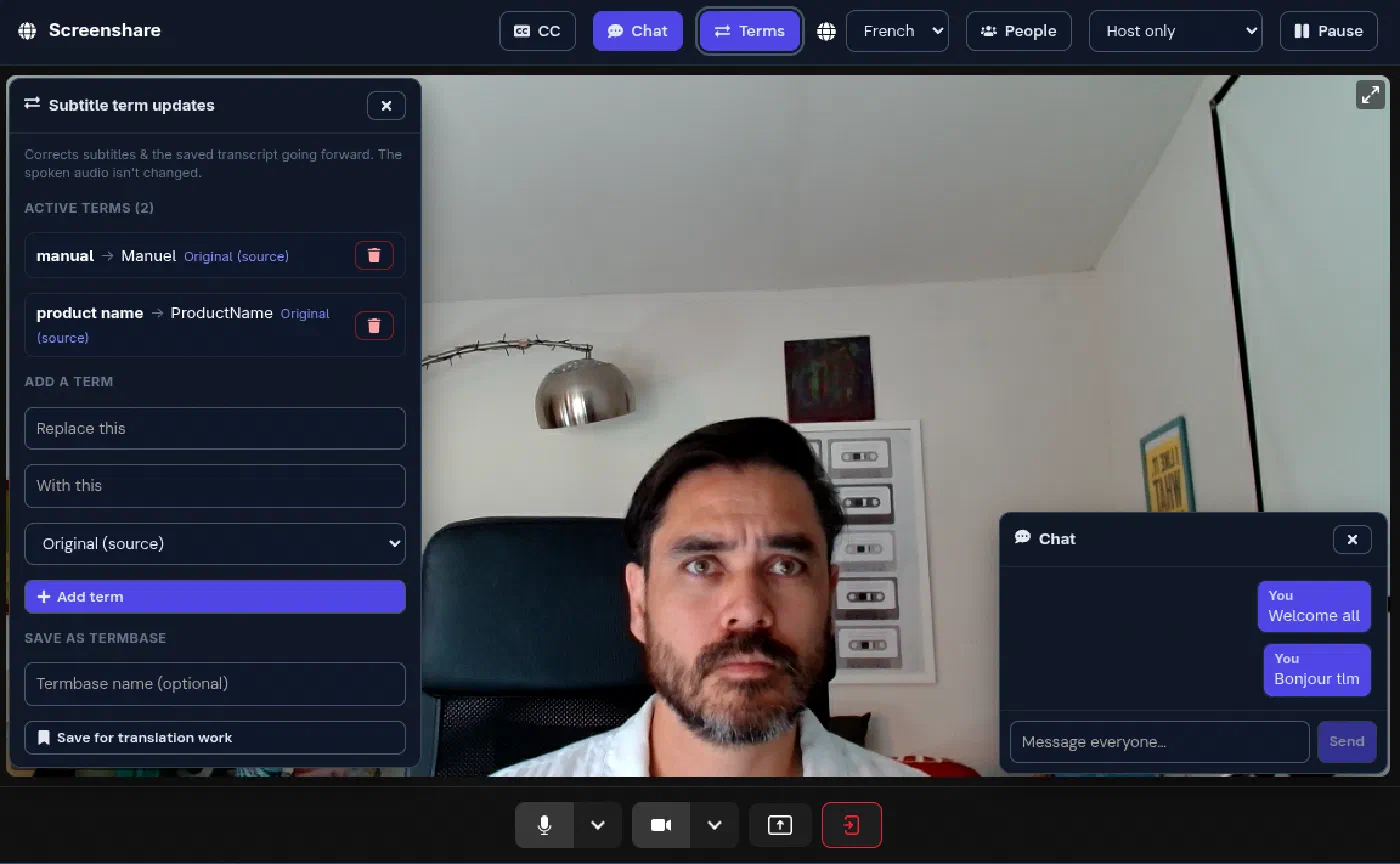
Fix a mistranslated name or term once, and the captions, audio prompts and saved transcript use the correction from then on. Attendees suggest; the host approves.
Deliver the record
Transcript in every language (add more after the event), the correction log, attendance and billable usage, ready to export for the client and for your invoice.
Made for whoever has to run the event
Per-language channels
Every listener can pick the channel they need, with up to 70 listener languages available. Fifty listeners in French share one channel. Attendees never run up the bill.
Live subtitle correction
Host-moderated find-and-replace on captions, terminology and transcript, applied live and backfilled. Change terms on the fly and log every correction for the report.
Immediate speech recognition
Low-latency speech recognition with automatic language detection keeps multilingual conversation moving naturally, without forcing every speaker into a rigid meeting-app workflow.
Terminology in, terminology out
Attach a termbase and its terms are enforced from the first sentence. After the event, export new corrections back, so each session leaves the next one better prepared.
Transcripts & replay
Timestamped transcripts and recording replay with captions. Need Italian after the fact? Generate a new transcript language on demand.
Reports & metering
Every session produces a report: languages, translated channel-hours, attendance, corrections and cost, with a CSV export for invoicing.
Data control
Per-session retention windows delete recordings and transcripts on schedule. Media runs on our own infrastructure.
Made for events with something at stake
- Interpreting & translation agencies
- Training and e-learning sessions
- Webinars and town halls
- Sales demos and client meetings
- Public sector and community sessions
- Multilingual video production
Built to resell
Sell natural, low-cost interpreted conversation under your own workflow. LanguageOps Live handles the live speech, channels, terminology and reporting; you own the client relationship.
-
Wholesale channel-hours
Buy capacity at agency rates, price the event your way: per language, per event, or bundled with your PM and terminology service.
-
Client-ready reports
Minutes after the session ends, hand the client a clean report of the transcript, corrections, attendance and usage.
-
Terminology aftercare
Corrections made live become termbase entries for the client’s next event, document translation or website, all in the same suite.
A long way beyond generic meeting translation
| Capability | LanguageOps | Major meeting translation tools |
|---|---|---|
| Scheduled sessions with passworded guest access (no accounts) | Yes | Often account/app required |
| Up to 70 listener languages | Yes | Limited or captions-led |
| Separate translated audio channel per language | Yes | Usually captions-first |
| Automatic source language detection | Yes | Limited or manual setup |
| Fix a mistranslated name or term during the event | Yes, live and host-moderated | Rarely |
| Host floor control and moderation | Yes | Basic mute |
| Transcript per language + add languages afterwards | Yes | Single transcript, if any |
| Post-event report with billable usage | Yes, with a CSV for invoicing | No |
| Retention windows for recordings & transcripts | Per session | Platform-wide policy |
Priced by the channel-hour, with listeners free
1 translated channel-hour = one source audio channel translated into one target language for one hour. A 1-hour event in French + Spanish + German is 3 channel-hours. Attendees are free — invite as many listeners as the event needs.
Event packs
One-off bundles of channel-hours for a single event or a short series. No subscription.
Monthly bundles
Starter, Team and Scale allowances for recurring meetings, webinars and programmes.
Managed events
We set up, rehearse, prep terminology, run the session and deliver the report. Your team just presents.
Common questions
Do attendees need an account or an app?
Which languages are supported?
Can we fix a wrong name mid-event?
What do we get after the event?
Where does our data live?
Run your next multilingual event on LanguageOps Live
Start with a pilot session or let us run the first one with you as a managed event. It is built for natural, affordable conversation across languages, with interpreting inside the meeting instead of captions bolted on top.