Translate millions of words without breaking the job into smaller files
LanguageOps is built to keep very large localisation projects manageable. Upload, process, assign, translate, review, and export structured files with millions of words, including our 2-million-word JSON example and a 250,000-word Excel workbook.
- 2,000,000-word JSON
- 250,000-word Excel
- 500,000 segments
A two-million-word file is still one file
Splitting a structured source into dozens of smaller files creates versioning, assignment, consistency, and reassembly problems. LanguageOps keeps the original job together while giving the team practical ways to work through it.
-
Keep structured content intact
Process large JSON and other structured files without manually cutting the source into arbitrary pieces before translation begins.
-
Handle substantial spreadsheets
Bring high-volume Excel workbooks into the same translation, revision, terminology, memory, and QA workflow as other content.
-
Share the work and keep the file whole
Assign work across translators and reviewers while the project remains one controlled source of truth with shared language assets.
See a million-word project moving through LanguageOps
This walkthrough will show the large-file upload, processing state, assignment, editor workflow, progress tracking, and export using the example projects shown above.
One continuous workflow from upload to delivery
- Ingest
Upload the original file
Add the JSON, Excel workbook, or other supported source format as one project and select the required target languages.
- Prepare
Extract and segment at scale
LanguageOps processes the source into translation-ready segments while retaining the information needed to rebuild the finished file.
- Operate
Assign, translate, and review
Distribute the workload, apply translation memory and terminology, track progress, and move completed content through revision and QA.
- Deliver
Export the completed file
Rebuild the translated output from the approved segments instead of manually merging a collection of temporary files.
The same translation detail, even when the word count is seven figures
A very large project still needs segment-level context, terminology, review, progress visibility, and reliable output. The file size should not remove those controls.
Visible processing and progress
Follow workflow stage, readiness, segment totals, word count, assignment, and completion progress from the project view.
Parallel team assignments
Spread a large workload across translators and reviewers without creating competing copies of the original source file.
Memory across the entire project
Use exact and fuzzy matches across repetitions and related content, then save approved translations for future jobs.
Shared terminology
Apply one termbase across hundreds of thousands of segments so product, technical, and branded language remains consistent.
Revision and QA
Move the project through translation or revision stages, review changes, and run quality checks before final export.
Reconstructed output
Return approved target content to the required structured or spreadsheet deliverable without a manual merge operation.
From a quarter-million-word workbook to multi-million-word structured data
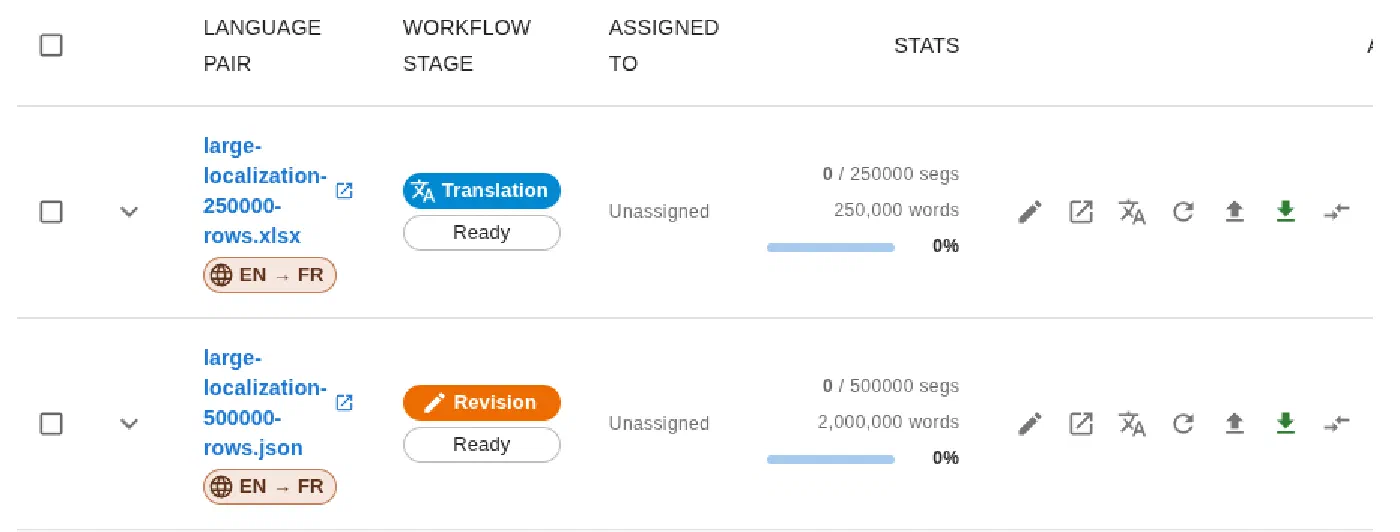
The screenshot comes directly from LanguageOps and shows both example workloads ready in the project list.
-
2,000,000-word JSON
A 500,000-row JSON source represented as 500,000 segments and 2,000,000 words in a single revision project.
-
250,000-word Excel
A 250,000-row XLSX workbook represented as 250,000 segments and 250,000 words in a single translation project.
-
Designed beyond two million words
The workflow is designed to remain usable for projects over two million words without requiring the source to be divided into smaller jobs first.
Scale the volume without losing the workflow
- Original source-file structure
- Project and segment progress
- Translator and reviewer assignments
- Translation memory and terminology
- Revision history and QA
- Completed reconstructed export
Large-file processing is part of LanguageOps
Large-file preparation, translation workflow, assignments, review, and export are included with LanguageOps. AI translation and other model-assisted actions use AI tokens from your account usage.
Large file translation questions
Can LanguageOps handle a file with more than two million words?
Do we need to split a large JSON or Excel file before uploading it?
Can several translators work on the file?
How large is the Excel example?
When will the product walkthrough be available?
Bring us the file your current workflow cannot comfortably open
Show us the format, word count, and delivery requirements. We will demonstrate how LanguageOps keeps the project workable from processing through export.